Android Automotive in Docker: a Cuttlefish debugging story
Booting Android Automotive 15 as the virtual infotainment unit of a simulated car — and the two deep bugs on WSL2: vsock via LD_PRELOAD, and WebRTC ICE vs Docker Desktop.
Why put Android in the virtual car
The previous post covered building a virtual car: ECUs as containers, real signal databases, virtual CAN/LIN/Ethernet buses. That stack tests ECU-to-ECU logic well, but the infotainment unit (IHU) is a stub — and the interesting HMI questions (“does the warning actually appear on the driver’s screen?”) need the real thing.
The real thing is Android Automotive OS (AAOS), and Google ships a way to run it without hardware: Cuttlefish, a virtual device that boots real Android images on crosvm. The goal: Cuttlefish as one more container in the compose stack, wired to the vehicle buses, streamed to the browser over WebRTC. The instrument cluster shows the speed from the chassis bus; warnings from the central ECU pop up on the screen.
It works — cold boot ~3 minutes, warm boot ~30–40 seconds, viewable from any browser on the LAN. Getting there involves two genuinely deep bugs that anyone reproducing this setup on Windows/WSL2 will hit, and they’re the actual content of this post.
The setup in one block
Cuttlefish needs KVM, so the hard requirement is /dev/kvm — Linux bare metal or WSL2. macOS has no KVM; the ECU containers run there but the Android VM never will. The IHU joins the same compose stack as the ECUs via an overlay file:
docker compose \
  -f build/<vcar>/docker-compose.yml \        # generated: ECUs + brokers + buses
  -f components/cuttlefish/compose.yaml \     # overlay: the Android VM
  --profile playback --profile ui up -d
One trick worth stealing: put Android’s device state on a named volume. The first boot unpacks images into it (~3 min); every later compose down/up on the same machine finds them and warm-boots in ~35 s. Free 5× speedup for the daily loop.
This is what boots — a real Android Automotive home screen, streamed to the browser, with gear state, range, and vehicle controls wired to the virtual buses:
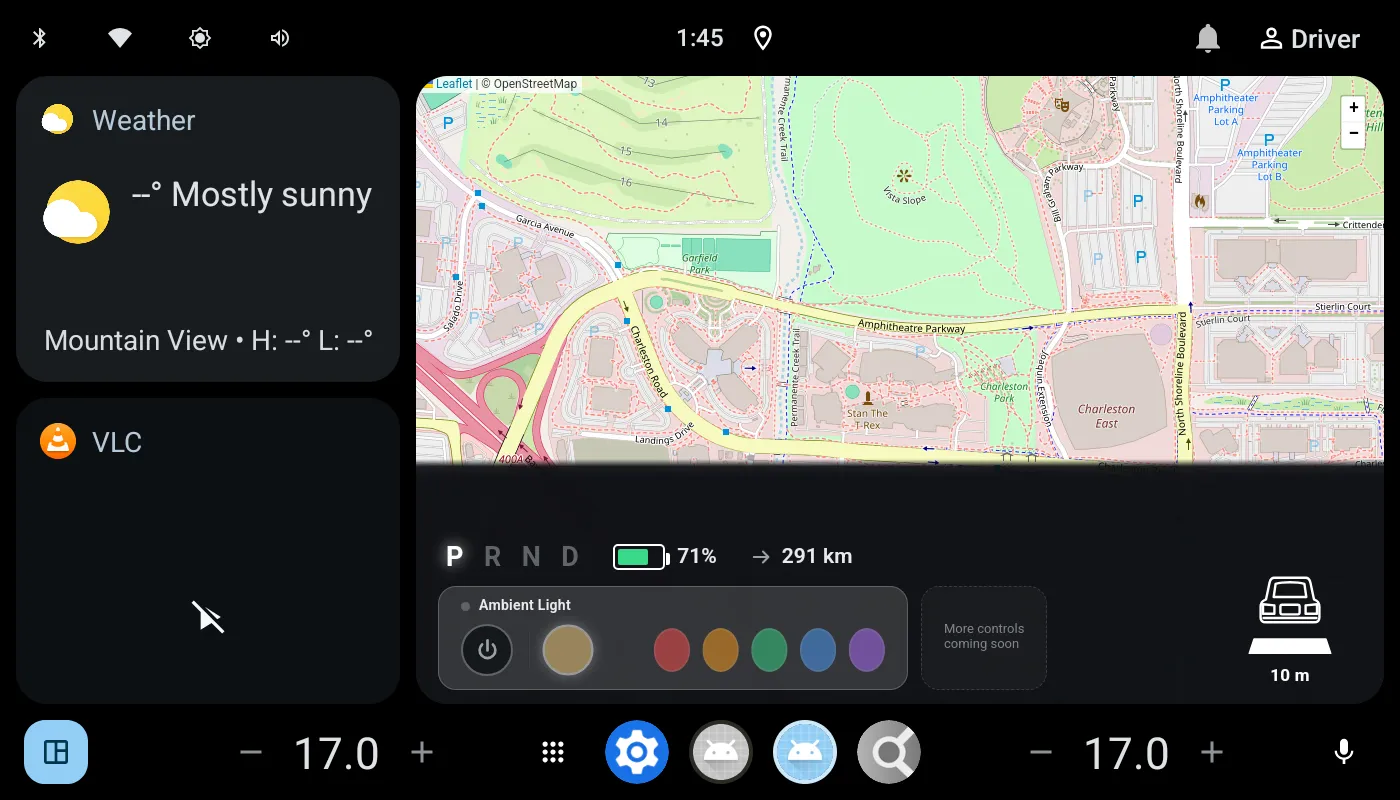 Not a mockup — AAOS 15 in Cuttlefish, viewed over WebRTC. The gear strip and range readout are fed by VHAL properties you can drive from the bus.
Bug #1 — no vsock on WSL2
On Linux everything booted. On WSL2, crosvm died instantly: creating any AF_VSOCK socket returns ENOSYS. Cuttlefish uses vsock for most host↔guest channels, so this is fatal.
The root cause is structural: WSL2’s kernel already uses the Hyper-V vsock transport to talk to Windows, and the vhost-vsock module crosvm depends on isn’t available inside the distro. No flag fixes that; the syscall itself is a dead end.
The fix has two halves:
--vhost_user_vsock=true— crosvm supports a userspace vsock backend (vhost_device_vsock) instead of the kernel module. That gets the VM side of vsock out of the kernel’s hands.- An
LD_PRELOADshim for the host-side tools. They still callsocket(AF_VSOCK, ...)directly. We wrote a small C library that interceptssocket/bind/listen/connect, and when the family isAF_VSOCK, silently redirects to UNIX domain sockets at a well-known path (/tmp/vsock_3_0/vm.vsock_<port>— the same layout the userspace backend exposes). Every tool now “speaks vsock” over plain UNIX sockets without knowing it.
/* the core of the shim — everything else is bookkeeping */
int socket(int domain, int type, int protocol) {
    if (domain == AF_VSOCK)
        return real_socket(AF_UNIX, type, 0);   /* remember fd → translate later */
    return real_socket(domain, type, protocol);
}
The launcher auto-detects: shim compiled → WSL2 mode; absent → stock behavior. One code path, both platforms.
The general lesson: when a syscall is unavailable in your environment, LD_PRELOAD lets you re-route an entire toolchain at the ABI boundary without patching a line of it. It’s a blunt instrument, but for “vendor binary meets exotic kernel” problems it’s often the only instrument.
Bug #2 — WebRTC connects to nothing
Second symptom, subtler: the stack boots, the browser loads the streamer page, the device list shows up… and the video connection dies after ~21 seconds with “No connection to the guest device.”
WebRTC diagnosis 101: look at the ICE candidates. The streamer enumerates the network interfaces it can see and advertises each as a host candidate. Inside Docker Desktop’s bridged network, the only interface it sees is its container IP — 172.18.x.x, an address inside Docker Desktop’s hidden utility VM that no Windows browser can route to. Every candidate is unreachable; ICE times out; no video.
Two changes fix it properly:
- Native Docker instead of Docker Desktop. Docker Desktop runs containers inside its own VM, so even
network_mode: hostbinds to the wrong host. With nativedockerdinside the WSL2 distro, host networking means the distro itself — whoseeth0the Windows browser genuinely can reach over the WSL vEthernet adapter. network_mode: hostfor the streamer container — so it advertises the reachable IP:
cuttlefish:
  network_mode: host
  networks: !reset null   # compose merge: base file declares networks; the two are mutually exclusive
(That !reset is a compose-overlay YAML tag worth knowing: the base file sets networks:, network_mode conflicts with it, and !reset is how an overlay removes an inherited key rather than merging into it.)
With both in place, the streamer binds the host’s real IPs, all its ports land on the host implicitly, and the previous workaround pile — TURN relay config, an nginx shim faking the ICE config — got deleted. The fix that removes code is usually the right one.
One more paper cut for the road: the streamer serves HTTPS with a self-signed cert, and WebRTC APIs only exist in secure contexts — so you must click through the browser warning (or type thisisunsafe in Chrome). Not a bug, but it eats ten minutes of everyone’s first day.
What I’d tell past me
- Check
/dev/kvmfirst. Every “Cuttlefish won’t boot” report starts there. No KVM, no VM — nothing else matters. - Treat “works on Docker Desktop” as unverified. Its extra VM breaks host networking, device passthrough, and anything that advertises its own address (WebRTC, mDNS). Native dockerd in WSL2 behaves like Linux; Desktop only mostly does.
- When streaming fails, read the ICE candidates before anything else. The offered addresses tell you immediately whether the problem is networking (unreachable IPs) or media.
- Persist VM state in a named volume. 3 minutes → 35 seconds per iteration, for one line of YAML.
- Restart the whole stack, never one service. Same lesson as the ECU post, doubly true with a VM in the dependency graph.
The payoff of all this: an engineer with a laptop — no bench, no head unit, no cables — boots a full virtual car with a real Android Automotive screen in under a minute and sees their ECU change appear in the actual HMI. That loop used to require hardware access. Now it requires docker compose up.