RemotiveLabs field cheatsheet
A one-page, hand-verified reference for the RemotiveLabs toolchain: CLI command map, broker verbs, record & replay in 3 steps, offsets, versions, and every gotcha we hit.
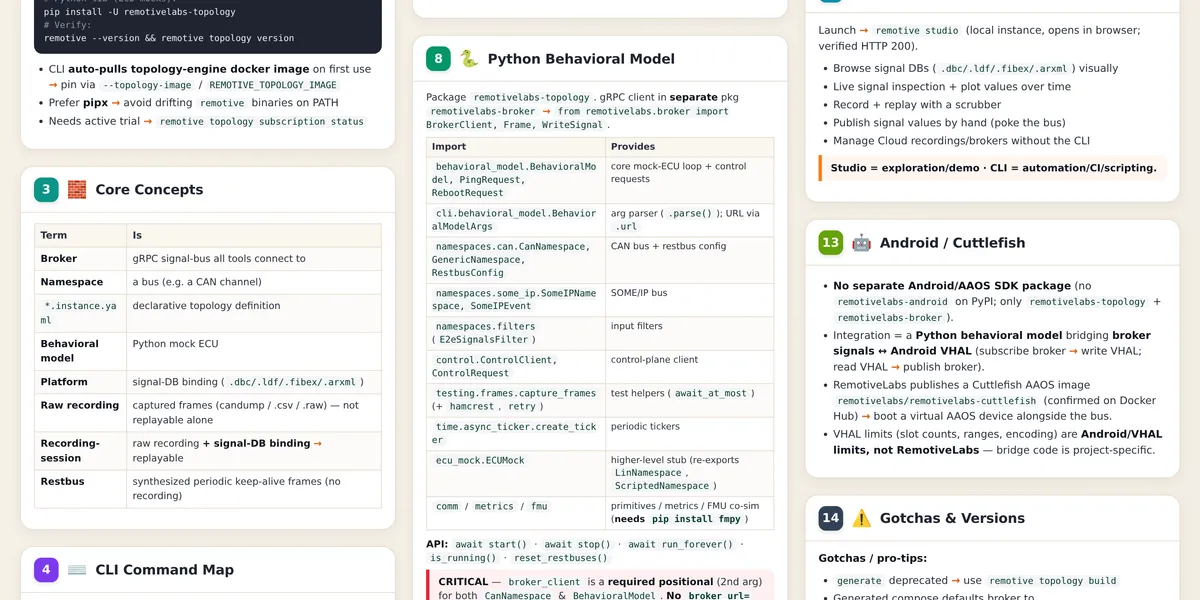
If you work with the RemotiveLabs toolchain — or are about to, after reading the virtual-car posts — the same questions come up on repeat: which CLI group does X live under? why is playback 1000× too fast? why won’t the broker start? This one-page field cheatsheet answers them at a glance. Every command and gotcha on it was verified against a live install (CLI 0.21.0, topology-lib 0.20.0) rather than copied from docs.
Download the PDF — print it, pin it next to your desk. The full-resolution poster is above; below are the parts I use most, in searchable text form.
The 60-second tool map
| Component | Does |
|---|---|
| Broker | gRPC signal-bus server; everything connects to it — raw frames in, named signals out |
| Topology | declarative *.instance.yaml → a runnable docker-compose of ECU stubs + broker |
| Behavioral models | Python mock ECUs that react to signals and emit signals |
| Record & Replay | capture real bus traffic, replay it into a virtual bus |
| Studio | GUI — visualize signals, browse databases, record/playback |
| Cloud | hosted brokers, recording storage, signal-DB management |
CLI groups mirror this: remotive topology (build/validate/inspect), remotive broker (record, playback, signals, restbus), remotive cloud (projects/brokers/auth), remotive studio (local GUI). One habit fixes most confusion: talk to the broker, not to a CAN cable — everything is a named signal on the gRPC bus.
Record & replay is 3 steps, not 2
The single most common mistake. Record output is a raw recording; playback input is a recording-session that binds the raw capture to a signal database. Skip the middle step and playback can’t decode anything.
# 1 — record raw traffic
remotive broker record start <out> --namespace <bus> --url http://<broker>:50051
remotive broker record stop  <out> --namespace <bus> --url http://<broker>:50051

# 2 — bind it to a signal DB (REQUIRED — this creates the playable session)
remotive topology recording-session create -f <recording> <out>.recordingsession.yaml

# 3 — play it
remotive broker playback open <session> --url http://<broker>:50051
remotive broker playback play <session>
While it plays, run remotive broker signals subscribe — if the offset advances but nothing decodes, your session isn’t bound to the right database.
Offsets are microseconds. A bare number means µs: --offset 1000 is one millisecond. Always write a unit — --offset 10s, --offset 10000ms. The symptom of forgetting: playback appears to run ~1000× too fast or seeks to nowhere.
And the distinction that confuses every newcomer: restbus is not replay. Replay reproduces a recording; restbus synthesizes periodic keep-alive frames at a fixed cycle so the bus “looks alive” with nothing recorded at all.
Versions are coupled — pin everything
The broker, the platform schema, and the Python library version-lock against each other. The failure is E004 at build or startup, and the message won’t tell you which pair mismatched.
| Item | Known-good pairing (verified) |
|---|---|
| CLI | remotivelabs-cli 0.21.0 (via pipx) |
| Broker | RemotiveBroker 1.23–1.24 — set REMOTIVEBROKER_TAG explicitly |
| Platform schema | 0.16–0.17 with the broker above |
| Python lib | remotivelabs-topology 0.20.x |
Related traps: generated compose files bake in whatever ${REMOTIVEBROKER_TAG} was at build time — pin it in your environment, not your memory. remotive topology generate is deprecated in favor of build (works, warns). And pipx vs apt PATH shadowing: which -a remotive before debugging anything else.
The gotcha list
- Two installs, not one — the CLI (
remotivelabs-cli) runs topologies; the library (remotivelabs-topology) is what ECU code imports. Different packages, different upgrade cycles. topology buildneeds an active trial/subscription —remotive topology start-trial, thensubscription statusto confirm. The build error without it is not self-explanatory.- Plain
type: canneeds the RemotiveBus Docker plugin — or skip it entirely with CAN-over-UDP (settings.can.default_driver: udpin a settings instance file). - The playback broker must own the channel and have the signal database. Single-broker setups just work; multi-broker ones need a dedicated playback instance whose
mapping.devicesmaps recording devices to real channels — unmapped means the offset advances and zero signals come out. - First
topology buildis slow once — it pulls the topology-engine Docker image. Not a hang. - CLI drops a
remotive.yamlworkspace marker into the current directory on some commands. Know it’s the CLI’s, don’t commit it accidentally. - Rollback safely with pipx:
pipx install --force remotivelabs-cli==<ver>— staying on pipx keeps CLI and engine in lockstep.
Where this fits
The cheatsheet is the reference layer under the posts in this series: the virtual-car mental model, a hands-on first ECU, Android Automotive as the head unit, and CARLA physics on the chassis bus. Everything on the poster came out of building those.